








Welcome to Our Help Desk.
You will get all the detailed information for your queries related to our Shopify apps.

-
App DashBoard

-
Basic requirement for Shipping Rates
-
Shipping Settings
-
Shipping Zones & Rates
- Add shipping zone and select country
- Add Shipping Rates on Shipping Zone
- Shipping Origin Locations with Schedule Rate
- Shipping Rates Conditions
- Set State/ZipCode for the rate
- Surcharge Shipping rates based on Order Weight, Order Quantity
- Set different Base Rate Price according to order weight, total or qty
- Exclude rate for products
- Rate Modifiers
- Send another rate (Duplicate rate)
- Fallback Shipping rate (Catch Zone)
-
Shipping integration with
-
Estimated shipping widget
-
Delivery Date and Store Pickup Settings
- Show Delivery date and time in Thank you page
- Google Map API Key for Store Pickup
- Install Delivery date widget on your theme
- Set Condition For Local Delivery And Store Pickup
- Set the cut-off time on the current day or the minimum interval day
- Combine slot for Local Delivery & Store Pickup
- Display same location product in cart
- Date/Time option visible for Store Pickup?
- Delivery date General settings like text, color, error message, etc…
- Now you have to add Location and local delivery
-
Local Delivery and Store Pickup
-
Delivery Date
-
Mix Shipping rates and Delivery date
-
Plan and Pricing
-
Question and answer
-
Other
Set different Base Rate Price according to order weight, total or qty
 6568 Views
 May 05, 2022
We have base rate which is always added with the addition cost of the shipping.

Example:
Base rate + surcharge shipping
Now if you want to revise the base rate based on condition then you can do it using Base Rate Price Tier.

You can modify the base rate using Price, Weight, QTY, and Distance.
Select the condition based on your need and hit the Add Tier.

Here you can set the Min cart Price and Max cart price then the Base price will be.

Here you can see in above screenshot my default base price is $10 but if cart total is in between $100 to $200 then the base price will be $5.
With base rate tire if you want to add some addition rate like base on QTY, Base on cart Percentage, And base on weight then here is the way.
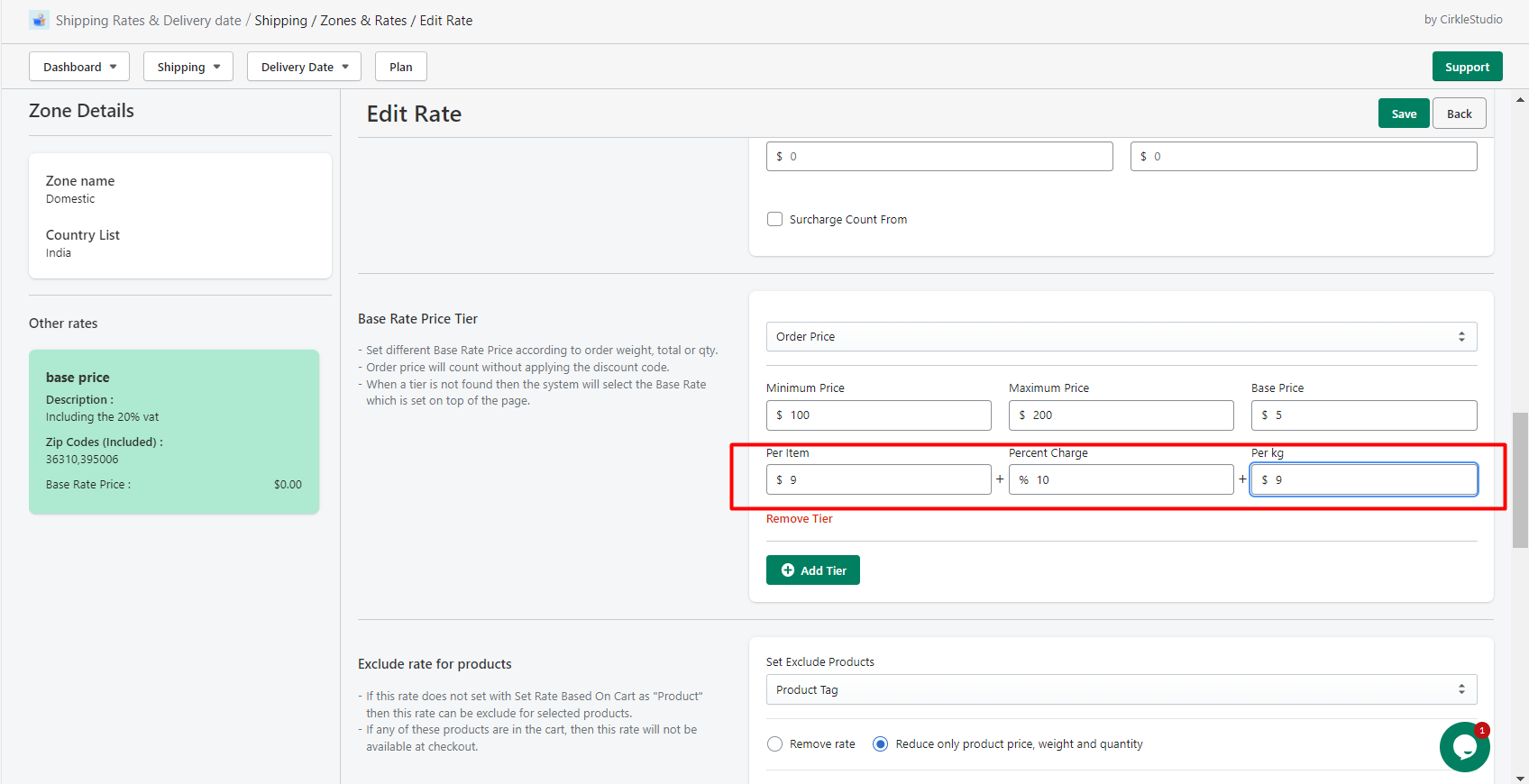
Here in this image I set the addons price like 9 per item, 10% of my cart total, and 9 per KG.
Example
Here how the final shipping rate is count by the app. My cart total is $150, Total 3 QTY and 2KG weight.
My cart total is $150 so the base price is $5.
Base price $5 + 9*3 ($9 per item rate) + $15 (150*10%) + 9*2 (each kg weight charge $9) = $65 final shipping rate for my shopify checkout.
I hope you understand this calculation about this additional rate.